
 Log in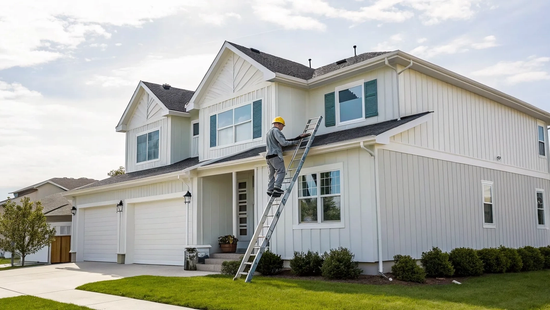
Unlike cable or DSL, which use your home’s existing copper phone or TV lines, fiber internet requires a brand-new, dedicated connection. A thin, durable glass cable is run directly to your house, creating a private, high-speed lane to the internet. This physical connection is the secret to fiber’s incredible performance, and it’s central to understanding how is fiber internet installed in a home. It’s a hands-on process that builds a direct link from our network right to your living room. We’ll walk you through each stage, from bringing the line to your property to setting up your Wi-Fi for perfect coverage.
Key Takeaways
- Fiber is a fundamentally different technology: It uses light signals through glass cables to give you a dedicated, ultra-fast connection, unlike the shared copper wires used by cable and DSL. This means your speeds stay consistent, even when the whole neighborhood is online.
- Your role in the installation is simple: A technician handles all the technical work, from running the line to setting up the equipment. Your main jobs are to be home for the appointment and help pick a clear, practical spot for the new router.
- Upgrading is an investment in your home's digital life: Fiber provides the massive capacity needed to support all your family's devices at once without slowdowns. It prepares your home for future technology, adding lasting value and ending daily internet frustrations.
What Is Fiber Internet, Anyway?
So, what’s the big deal about fiber internet? Think of it like this: older internet types, like cable and DSL, send data through copper wires, which is a bit like sending water through a winding, old pipe. Fiber internet uses fiber-optic cables, which are incredibly thin strands of glass that transmit data as pulses of light. Since light travels at, well, the speed of light, this technology is a massive leap forward. It’s a direct, clear path for your data to travel, free from the interference and slowdowns that plague older copper-based systems.
For you, this means a faster, more stable, and more reliable connection. It’s the difference between a movie that buffers endlessly and one that streams in perfect 4K. It’s a video call that’s crystal clear versus one that freezes at the worst possible moment. Unlike other internet types that can slow down when everyone in your neighborhood gets online, fiber often provides a dedicated connection to your home. This gives you the consistent, high-speed performance you need for everything from working from home to powering a house full of smart devices. It’s simply a more modern and powerful way to connect to the internet. This technology isn't just about faster downloads; it's about creating a seamless online experience across all your devices at the same time, without compromise.
Fiber vs. Cable
You’ve probably seen ads for cable internet, which uses the same coaxial cables that deliver your TV service. While it can be fast, it’s a shared connection. This means you’re sharing bandwidth with your neighbors, so your speeds can drop significantly during busy times, like evenings and weekends. Fiber internet, on the other hand, typically provides a dedicated line to your home, so your speed isn't affected by what others are doing. Plus, fiber offers symmetrical speeds, meaning your upload and download speeds are equally fast. This is a huge deal for video calls, uploading large files, and online gaming. Fiber is also more resilient, as the glass cables aren't as susceptible to weather damage as copper lines can be, ensuring a more consistent performance year-round.
Fiber vs. DSL
DSL, or Digital Subscriber Line, runs on the old copper telephone lines already in your home. It was a great step up from dial-up, but its technology is dated and can't keep up with today's demands. The biggest drawback is speed. Because the signal weakens over distance, your connection speed depends on how far you live from the provider's central office. Fiber doesn't have this problem. It delivers ultra-fast gigabit speeds reliably, regardless of distance. DSL also has much slower upload speeds compared to its download speeds, which can make video conferencing and sending large files a real chore. Fiber offers a far more efficient and powerful connection because of how the technology works.
Fiber vs. Satellite
Satellite internet is a good option for very rural areas where no other service is available, but it comes with significant trade-offs. Data has to travel from your home to a satellite in space and back again, which creates a noticeable delay called latency. This lag makes real-time activities like online gaming or video calls feel sluggish and disconnected. Satellite connections are also easily disrupted by bad weather like rain or snow and often come with strict data caps. Fiber internet provides a direct, physical connection that is incredibly low-latency and highly reliable. It’s why fiber is considered the gold standard and the future of internet technology, offering the speed and stability you need without the frustrating delays or data limits.
What Gear Do You Need for a Fiber Install?
Getting new tech can feel complicated, but setting up fiber internet is surprisingly straightforward. You don't need to buy any special gadgets, as our technician brings everything required to get you connected. The two main pieces of hardware are the Optical Network Terminal (ONT) and your Wi-Fi router. The ONT brings the fiber connection into your home, and the router creates the fast, reliable Wi-Fi you use for work and streaming. We provide all the necessary Novos Fiber equipment to ensure you get the best performance. Your only job is to think about where you’d like the equipment to live, and our technician will handle the rest.
The Optical Network Terminal (ONT)
The Optical Network Terminal, or ONT, is the first stop for the fiber connection in your home. It’s a small box that acts as a bridge, converting light signals from the fiber optic cable into an electrical signal your router can understand. You might hear it called a "fiber jack," but its role is the same. Our technician will install this low-profile device on an interior wall near where the fiber line enters your house. It’s the essential link between our network and your home.
Your Router and Wi-Fi Setup
The ONT connects to your Wi-Fi router with an Ethernet cable. The router creates your wireless network, allowing all your devices to get online. To experience fiber’s incredible speeds, you need a modern router that can keep up. That’s why we provide a high-performance router designed for our high-speed fiber internet. Our technician will set it up and help you place it in a central location to ensure you get a strong, consistent Wi-Fi signal throughout your home.
Finding a Power Source
This might seem obvious, but it’s a key part of the setup. Both the ONT and the router need to be plugged into a standard electrical outlet. Before your installation day, it helps to identify a few potential spots for your new equipment that are close to a power source. Don’t worry about finding the perfect place on your own. Our technician will do a walkthrough with you to find a location that is practical, provides the best Wi-Fi coverage, and has easy access to power.
How to Get Ready for Installation Day
Your installation day is the final step before you get to enjoy blazing-fast fiber internet. A little prep work can make the whole process go smoothly. Think of it as rolling out the welcome mat for your new connection. Our technicians are experts, but taking a few minutes to get your home ready ensures they can get you set up efficiently. Here’s a simple checklist to run through before your appointment.
Pick a Spot and Clear the Way
Your new internet equipment needs a good home. The technician will help you pick the best spot, but it helps to have a location in mind. Ideally, you’ll want a central spot in your house to get the strongest Wi-Fi signal everywhere. It also needs to be near a power outlet and away from obstructions like thick walls. Once you’ve scouted a location, do a quick tidy-up. Clearing away any clutter or furniture gives our technician easy access and a safe space to work, which helps speed up your internet installation.
Know Your Home's Layout
Every home is a little different, and knowing your layout helps you understand how we’ll bring the fiber connection inside. For newer homes, there might already be special tubes (conduits) in place that make the process simple. In older houses, our technician may need to run the fiber line discreetly along an outside wall and then drill a small, sealed hole to bring it indoors. Take a moment to think about the path from the street to where you want your equipment. Having a general idea helps you have a productive conversation with the technician about the best route.
Schedule the Appointment (and Plan to Be There)
This is a big one: a technician will need to visit your home, and someone over 18 has to be there for the entire appointment. A standard installation usually takes about four to six hours, so it’s a good idea to block off that time in your calendar. The technician needs access to your property, which might include your backyard and inside your house, to run the line and set up the equipment. Being home means you can answer questions and confirm equipment placement. If you have any questions before your appointment, our support team is always here to help.
The Fiber Installation Process, Step by Step
So, you’ve signed up for fiber internet, and installation day is on the calendar. What actually happens when the technician arrives? It’s a lot more straightforward than you might think. Unlike older internet technologies that use existing phone or cable lines, fiber optic internet requires a brand new, dedicated line to be run to your home. This is what gives it that incredible speed and reliability, but it also means the installation is a bit more hands-on. The process is all about getting that super-fast connection from our network right into your home so you can start streaming, gaming, and working without a hitch. A trained technician handles all the technical work, but knowing the key steps can help you feel prepared and ensure everything goes smoothly. From the initial check of your property to the final speed test, we make sure every step is handled with care. This isn't just about plugging in a modem; it's about building a direct, high-performance link to the internet that will serve your home for years to come. Let’s walk through the four main stages of a typical fiber installation so you know exactly what to expect on the big day.
The Initial Site Check
Before the main event, a technician might swing by for a quick site check. This isn't always necessary, but it’s a helpful first step to map out the best path for the fiber optic line to your home. They’ll look at the distance from the nearest connection point, often a utility pole or a small box in the neighborhood, to your house. The goal is to identify the cleanest, most direct route and spot any potential obstacles ahead of time, like landscaping or a tricky driveway crossing. This quick survey helps prevent any surprises on installation day, making the actual setup process much faster and more efficient for everyone involved.
Bringing the Fiber Line to Your Home
This is where the magic begins. The technician will run a durable fiber optic cable from the main neighborhood connection point directly to an exterior wall of your house. They are experts at doing this neatly, often following the path of other utility lines to keep things tidy. To bring the line inside, they may need to drill a very small, discreet hole, but they will always look for an existing entry point first, like a spot where old cable or phone lines used to run. This ensures the new line is secure, protected from the elements, and ready to connect to your indoor equipment. It’s a key step in building the physical bridge to the high-speed internet you’re waiting for in the communities where we serve.
Connecting the Main Box (ONT)
Once the fiber line is inside, the technician will install a small device called an Optical Network Terminal, or ONT. Think of the ONT as a translator; it converts the light signals from the fiber optic cable into an internet signal that your router and devices can understand. This box is usually mounted on an interior wall, often in a garage, basement, or utility closet, and needs to be plugged into a nearby electrical outlet. The technician will work with you to find the best spot for it and get it connected, creating the central hub for your new fiber network. If you ever have questions about this equipment, our local customer support team is always here to help.
Setting Up and Testing Your Network
The final step is getting you online. The technician will connect the ONT to your Wi-Fi router or gateway with an Ethernet cable. They’ll help you find a central location for your router to ensure you get the best possible Wi-Fi coverage throughout your home. Once everything is powered on and connected, they’ll run a few speed tests. This is the most satisfying part, as it confirms you’re getting the incredible speeds promised by your plan. They won’t leave until they’ve verified that your connection is stable, fast, and ready for you to use, delivering on the promise of our high-speed internet plans.
How Long Does Fiber Installation Take?
So, you’re ready to make the switch to blazing-fast fiber internet, but you have one big question: How long will you have to wait? It’s a totally fair question. You’ve got a busy life, and you need to know what to plan for. The good news is that the installation process is usually pretty smooth, but the total time can vary. The whole process breaks down into two main parts: the work that happens outside your home to bring the fiber line to you, and the in-home appointment where a technician gets you connected.
The timeline for the outside work can depend on a few things, like your neighborhood’s existing infrastructure and local permits. Sometimes this part is already done, and other times it can take a few weeks to get the line ready. Once that’s handled, the in-home setup is much more predictable. We’ll walk you through the average timeframes and what to expect on the day of your appointment so you can feel completely prepared. Our goal is to get you connected to our high-speed service with as little disruption to your day as possible.
The Average Timeframe
Let's talk about the appointment itself. Once a technician arrives at your home, the actual hands-on installation is surprisingly quick. For most standard setups, you can expect the in-home visit to last between two to four hours. This gives the technician enough time to carefully run the fiber line inside, install the necessary equipment, and make sure your connection is stable and fast. They won't just plug it in and leave; they'll test everything to ensure your Wi-Fi is working perfectly. The goal is to get it right the first time so you can start enjoying your new internet without any hiccups.
What Can Make It Take Longer?
While the in-home appointment is usually straightforward, a few factors can extend the overall timeline from your sign-up date to installation day. The biggest variable is the work required to bring the fiber optic cable from the main network line to your house. If your home hasn't been connected to fiber before, this might involve some light outdoor work. Scheduling can also play a role, as appointment availability can vary. If your home has a particularly complex layout or requires custom wiring, that might add a little extra time to the technician's visit. We always aim to make the process as efficient as possible and will keep you in the loop every step of the way.
What to Expect on the Big Day
On installation day, a friendly technician will arrive to get you all set up. First, they’ll chat with you to find the best spot for the new equipment inside your home. They’ll then run a thin fiber optic cable from the outside connection point into your house. They always try to use an existing entry point, but if needed, they’ll drill a small, clean hole to bring the line in. After connecting the main box (the ONT), they will set up your router and test the Wi-Fi signal around your home to ensure you have great coverage. Before they leave, they’ll confirm everything is working perfectly. And if you ever have questions later, our local support team is always here to help.
Potential Snags During Installation (and How to Handle Them)
Even the smoothest projects can hit a small bump, and a fiber installation is no different. While our technicians at Novos Fiber are pros who handle this every day, knowing about potential snags can help you feel prepared and ensure everything goes off without a hitch. The good news is that most issues are minor and easily managed with a little bit of planning. Let's walk through a few common concerns and how to handle them.
Common Installation Myths
One of the biggest hurdles is simply misinformation. You might have heard that fiber-optic installation is super complicated, but that’s not the case. Our technicians are trained to make the process as simple and non-intrusive as possible. Another common myth is that fiber is only for tech wizards or that it's overkill for the average family. The reality is that with so many of us working from home, streaming shows, and connecting smart devices, a powerful, stable connection is more essential than ever. By understanding the truth, you can make an informed decision about upgrading your home internet.
Scheduling and Access Hiccups
The most common hiccup is often the simplest: scheduling. A standard installation can take between four and six hours, so it’s important to block out enough time in your calendar. You or another adult will need to be home for the entire appointment to let the technician in and answer any questions. Before they arrive, make sure the area where the equipment will be installed is clear and accessible. This includes the spot outside your home where the fiber line will come in and the interior wall where the main box will be mounted. A little prep work goes a long way in making the day run smoothly.
Working with an Older Home
If you live in an older home, you might worry about how new fiber optic cables will be installed. Rest assured, technicians have plenty of experience with all types of architecture. For older houses, the technician might run the fiber line discreetly along the outside siding and then bring it through an exterior wall to get inside. In some cases, they can even repurpose existing infrastructure. For example, old phone jacks can sometimes be converted into internet jacks, minimizing the need for new drilling. Our team will always find the least invasive and most effective path to get you connected.
Why Fiber Is Worth It
Going through an installation process for any new home service can feel like a big project. But when it comes to upgrading your internet, the one-time setup for fiber is a small step toward a massive leap in your daily online experience. Think of it less as a simple switch and more as a long-term investment in your home’s digital foundation. Our lives run on fast, dependable internet, whether we’re working from home, streaming our favorite shows, or connecting with family. A sluggish, unreliable connection just doesn’t cut it anymore.
Fiber internet is designed to meet the demands of modern life, not just for today but for years to come. It delivers on three key promises that older internet technologies simply can't match: incredible speed and consistency, a future-proof design that grows with your needs, and real, lasting value for your home or business. Once you’re set up, you’ll wonder how you ever managed without it.
Unbeatable Speed and Reliability
The magic of fiber internet lies in how it works. Instead of sending data through old copper phone lines, fiber uses thin strands of glass to transmit information as pulses of light. This means your data literally travels at the speed of light, giving you a connection that’s not only incredibly fast but also super stable. Unlike cable or DSL, fiber signals don’t weaken over long distances, so your performance stays consistent.
This technology allows for symmetrical speeds, meaning your upload speeds are just as fast as your download speeds. This is a game-changer for video calls, online gaming, and sending large files for work or school. With our various internet plans, you can say goodbye to frustrating lag and buffering for good.
Tech That's Built to Last
Choosing fiber is like future-proofing your home. The physical fiber optic cables installed today are capable of handling speeds far beyond what’s currently available. As technology evolves and our data needs grow, the network can be upgraded to deliver even faster service without having to replace the lines running to your house. It’s a foundation built for the future.
Plus, fiber optic cables are much more durable than their copper counterparts. They are less susceptible to interference and are not significantly affected by severe weather conditions like lightning or extreme temperatures, which means you get a more dependable connection year-round. As a company built on trust, we believe in providing a service that’s as resilient as the communities we serve. You can learn more about our commitment on our About Us page.
Smart Investment, Long-Term Value
In a world filled with smart TVs, security cameras, laptops, and phones all competing for bandwidth, you need an internet connection that can handle everything at once. Fiber provides the massive capacity needed to support a fully connected home or business without anyone’s experience slowing to a crawl. It’s an upgrade that supports your digital lifestyle and can even add to your home's value.
By bringing a high-speed fiber connection to your property, you’re making a smart investment in its infrastructure. It ensures that your home is ready for whatever new technologies come next. When you pair that powerful technology with a local provider that’s dedicated to serving your community, you get an unbeatable combination of performance and support. Check to see if we serve your area and get ready for a better internet experience.
Related Articles
Frequently Asked Questions
Will the installation process damage my home or yard? Not at all. Our technicians are trained to be as minimally invasive as possible. They will always look for an existing entry point for the fiber line first, like where old phone or cable lines used to run. If a new entry point is needed, they drill a very small, clean hole that is then professionally sealed to protect against weather. Their goal is to make the installation neat, discreet, and respectful of your property.
Is fiber internet really that much better for working from home or online gaming? Yes, and the reason is twofold: symmetrical speeds and low latency. Symmetrical speeds mean your upload speed is just as fast as your download speed, which is critical for clear, stable video calls and sending large files without a long wait. Low latency means there’s almost no delay in the data transfer, which eliminates the frustrating lag that can ruin an online game or cause you to talk over colleagues on a conference call.
Can I use my own Wi-Fi router, or do I have to use yours? We provide a high-performance router that is specifically optimized to deliver the full speed of your fiber connection throughout your home. While it is sometimes possible to use your own equipment, we recommend using the router we provide to ensure you get the best, most reliable performance. Our technician will set it all up for you so you don't have to worry about compatibility or configuration issues.
What if I live in an apartment or rental property? Getting fiber in a multi-unit building is definitely possible, but it often requires coordination with your landlord or property management company. Many modern buildings are already wired for fiber, which makes the process very simple. If yours isn't, we would need permission from the property owner to bring the service to your unit. The best first step is to check with your building manager to see if they have a partnership with a fiber provider.
How much time should I plan for the entire installation, from start to finish? The process has two main parts. First is the outside work to bring the fiber line to your property, which can take some time but doesn't require you to be home. Once that's complete, the in-home appointment is what you need to schedule. You should plan for the technician to be at your home for about two to four hours. This gives them enough time to run the line inside, set up the equipment, and test everything to make sure you're getting the incredible speeds you signed up for.


