
 Log in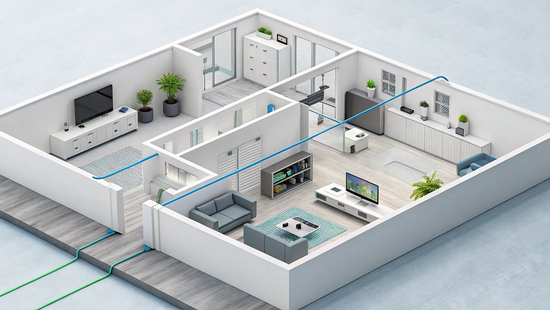
It’s frustrating when your internet connection feels like a mystery box. If the Wi-Fi drops or a video call lags, you want to know why. Gaining a basic understanding of your network’s structure puts you back in control. A home fiber optic network diagram demystifies your setup by showing you every component and how they connect, from the fiber line entering your house to the router broadcasting the signal. It’s a clear, visual answer to the question, "How does my internet actually work?" This knowledge empowers you to better manage your home network and communicate more effectively if you ever need support.
Key Takeaways
- Fiber technology is a direct connection to your home: Internet data travels as light through a glass fiber optic cable to a device called an Optical Network Terminal (ONT), which converts the signal for your router. This direct, uninterrupted path is what makes fiber incredibly fast and reliable.
- Your router's location determines your Wi-Fi quality: For the best signal throughout your house, place your router in a central, open area. Keeping it out of closets or cabinets prevents walls from blocking the signal and creating frustrating dead zones.
- Professional installation is essential for performance: Fiber optic cables are delicate and require specialized tools, so a technician's expertise is necessary for a proper setup. This ensures your network is configured correctly for optimal speed and reliability from day one.
What Is a Home Fiber Network?
A home fiber network is a system that uses fiber optic cables to deliver internet directly to your house. This setup is often called "Fiber-to-the-Home" or FTTH. Unlike traditional internet that relies on older copper or coaxial cables for the final stretch, a true fiber network uses hair-thin strands of glass to transmit data as pulses of light all the way from the provider's central hub to your living room.
This direct, uninterrupted connection is the secret behind the incredible speed and reliability of fiber internet. Think of it as a private, multi-lane highway for your data, free from the traffic jams and slowdowns that plague older networks. It’s an infrastructure built specifically for the demands of modern life, from streaming 4K movies and competitive gaming to running a business from your home office. With a dedicated fiber line, you get a consistent, powerful connection designed to handle everything you throw at it.
How Fiber Technology Works
The magic of fiber internet lies in its simplicity and efficiency. Data travels at nearly the speed of light through fiber optic cables. These cables are part of a Passive Optical Network (PON), which uses unpowered splitters to direct the signal from a central office to multiple homes. Because these core components don't require electricity, the network is more reliable and less prone to outages.
Once the fiber line reaches your home, it connects to a small device called an Optical Network Terminal (ONT). The ONT's job is to convert the light signals back into electrical signals that your router can understand and use to create your Wi-Fi network. This entire process happens almost instantly, giving you a seamless and incredibly fast internet experience.
Fiber vs. Copper Networks
The difference between fiber and older copper networks, like DSL or cable, is night and day. Copper-based systems were designed for telephone calls and television, not for the massive amounts of data we use today. They are more susceptible to interference, signal degradation over distance, and slowdowns during peak usage hours when your neighbors are all online.
Fiber, on the other hand, was built for data. It offers a significant advantage over legacy services because it can handle much more bandwidth and maintain its signal strength over very long distances. This means you get consistently fast speeds, whether you're video conferencing, downloading large files, or connecting dozens of smart home devices. It’s the foundation for a truly modern, connected home.
What's in a Home Fiber Network Diagram?
At first glance, a home fiber network diagram can look like a complex web of lines and boxes. But once you know what you’re looking at, it’s really just a simple map showing how blazing-fast internet travels from our network to your devices. Think of it as a roadmap for data. Understanding this map helps you see exactly why fiber is so much faster and more reliable than older internet technologies. It also helps you pinpoint the best spots for your equipment to get a strong signal in every corner of your home.
Every diagram will show a few key players working together to deliver your internet connection. The journey starts outside your home with fiber optic cables, which act as the superhighway for data. That data then flows to a special box called an Optical Network Terminal, which translates the signal for your home. From there, your router takes over, creating the Wi-Fi network you connect to every day. Let’s break down each of these components so you can read a network diagram like a pro and understand the high-speed fiber internet powering your home.
Fiber Optic Cables and Connectors
The foundation of your entire network is the fiber optic cable. These aren't your typical copper wires; they are incredibly thin strands of glass that transmit data as pulses of light. This technology is what makes fiber internet so powerful. In a Fiber-to-the-Home (FTTH) setup, this optical fiber runs directly from our central office all the way to your house. On a diagram, you’ll see this represented as the main line coming into your property. It’s the physical connection that brings the speed and reliability of light right to your doorstep, ensuring you have a direct, uninterrupted link to the internet.
The Optical Network Terminal (ONT)
Once the fiber optic cable reaches your home, it connects to a device called an Optical Network Terminal, or ONT. You can think of the ONT as a translator. It takes the light signals zipping through the fiber cable and converts them into electrical signals that your router and other devices can understand. This small box is a crucial piece of hardware, usually installed by a technician on an exterior wall, in your garage, or in a utility closet. On a network diagram, the ONT is the bridge between the outside fiber network and your internal home network, marking the point where the internet officially enters your home.
Your Router and Wi-Fi Access Points
Your router is the device you’re probably most familiar with. After the ONT translates the fiber signal, it sends it to your router through an Ethernet cable. The router then works its magic by creating your private home network. It directs internet traffic to all your connected devices, from your laptop and smart TV to your phone and gaming console. This is what allows you to have multiple devices online at the same time without them interfering with each other. For larger homes, you might also see Wi-Fi access points on a diagram, which extend your wireless signal to eliminate dead zones and ensure great coverage everywhere.
Network Switches and Splitters
While you won’t see them inside your house, optical splitters are a key part of the neighborhood network diagram. These passive devices, which don't require any power, take a single fiber optic signal from our central office and divide it to serve multiple homes. This is part of what makes a Passive Optical Network (PON) so efficient and reliable. Inside your home, you might use a network switch. If you have a lot of wired devices in one area, like a home office or entertainment center, a switch lets you plug them all into your network using a single port on your router.
How Data Travels Through Fiber
Fiber optic internet works by sending information as pulses of light through incredibly thin strands of glass. This technology is a huge leap from older copper cable networks, which use electricity to transmit data. Because light can carry massive amounts of information, fiber offers a faster and more reliable connection. Think of it as the difference between sending a message with smoke signals versus a laser beam. The laser is faster, clearer, and carries a more complex message. This is what allows fiber to handle everything from 4K streaming to competitive online gaming without breaking a sweat.
The Path of a Light Signal
Your internet data starts its journey at a central office, the hub connecting your local area to the wider internet. From there, data becomes light signals that travel through a main fiber optic cable. This is where the Fiber-to-the-Home (FTTH) architecture comes in. The light signal travels to a splitter in your neighborhood, which directs a portion of that signal to your house. This dedicated glass fiber line runs to the Optical Network Terminal (ONT) at your home, where the light is converted back into an electrical signal for your router to distribute as Wi-Fi.
The Benefits of Speed and Bandwidth
The biggest advantage of using light is the sheer volume of data it can carry, known as bandwidth. A fiber optic cable has significantly more bandwidth than a copper cable of the same size, meaning more data can be sent at once for faster speeds. It’s why multiple people in your home can stream movies, video conference, and game simultaneously without lag. Because fiber has such a high capacity, it’s also prepared for future technologies. As our internet needs grow, high-speed fiber internet can handle the demand without needing to replace the underlying infrastructure.
Why Fiber Is So Reliable
Fiber optic networks are inherently more stable than cable or DSL. First, the glass fibers are immune to electromagnetic interference from power lines or storms, which can disrupt the electrical signals in copper wires. This keeps your connection clean and consistent. Second, the network between the central office and your home has very few active electronic components that require power. This passive optical network (PON) design means fewer potential points of failure, giving you a more dependable internet connection you can count on.
How to Read a Home Fiber Optic Network Diagram
At first glance, a home fiber network diagram might look like a complex schematic meant only for technicians. But think of it more like a roadmap for your internet connection. It shows you the complete path data takes from our network right to your laptop or smart TV. Understanding this map can be incredibly helpful, whether you're trying to pinpoint a problem, optimize your Wi-Fi coverage, or just get a better sense of the powerful technology connecting your home. It visualizes how every piece of the puzzle, from the fiber line at the street to the router in your living room, works together to deliver the speed you rely on.
A fiber network diagram simply uses symbols and lines to represent the architecture and connectivity of your system. It’s a blueprint that helps you see the physical layout and the flow of data. For homeowners, this means you can easily identify key components, understand how they’re connected, and see where potential weak spots in your setup might be. It takes the mystery out of your internet setup and puts you in a better position to manage your home network effectively. This visual guide is especially useful when you're planning to add new devices, like smart home gadgets or a home office setup, as it helps you anticipate how your network will handle the extra demand. By learning to read it, you're not just looking at lines on a page; you're gaining a clear picture of the digital foundation of your home.
Decode the Diagram's Symbols
Think of a network diagram as a simple visual language. It uses a set of standard symbols to represent the different pieces of hardware in your network. A long, thin line typically represents the fiber optic cable itself. You’ll see boxes or rectangles that stand for devices like the Optical Network Terminal (ONT) or your Wi-Fi router. Smaller circles or connection points might indicate where cables are joined or split. While the specific icons can vary slightly, their purpose is always to give you a clear, at-a-glance view of your network’s structure. Learning to recognize these basic symbols is the first step to reading the entire map.
Trace the Signal from the Street to Your Screen
Your internet connection begins its journey long before it reaches your front door. With a Fiber-to-the-Home (FTTH) setup, a pure fiber optic line runs from our central office directly to your house. On a diagram, you can trace this path as a single, unbroken line coming from the main network infrastructure in your neighborhood. This direct line is what makes fiber so incredibly fast and reliable. It’s a dedicated, high-speed highway for your data, free from the slowdowns that affect older copper networks. This setup ensures you get the full power of our high-speed fiber internet for everything you do online.
Understand Connection Points and Equipment Placement
Once the fiber line reaches your property, the diagram will show it connecting to a small, weather-proof box on the outside of your house. This is often called the demarcation box. From there, a cable runs inside to a crucial piece of equipment called the Optical Network Terminal, or ONT. The ONT’s job is to convert the light signals from the fiber optic cable into an electrical signal that your router can understand and use. Your router then takes that signal and creates your home’s Wi-Fi network. Knowing where your ONT is located is useful if you ever need to troubleshoot your connection or get technical support.
Apply a Diagram to Your Home's Layout
Once you can read a fiber network diagram, you can start applying it to your own space. Think of it as creating a personalized map for your internet connection. Every home is different, so your diagram will be unique to your layout, your devices, and how you use the internet. This step helps you visualize where your equipment should go for the strongest, most reliable signal throughout your house.
Mapping your network helps you pinpoint the best locations for your router and any Wi-Fi extenders. It also gives you a clear picture of how the fiber optic signal travels from the street into your home and connects to your devices. Whether you live in a single-story ranch or a multi-level townhome, understanding this flow is key to getting the most out of your high-speed connection. With a clear plan, you can ensure every room gets the coverage it needs for seamless streaming, gaming, and working from home.
Map Out Your Cable Paths
The first step is to trace the physical path of the fiber optic cable. Your connection begins at the street, where a main fiber line runs through your neighborhood. From there, a dedicated "drop cable" branches off and runs to your house, connecting to a small demarcation box mounted on an exterior wall. This box is the official entry point for your internet service.
Inside, a thinner, more flexible fiber optic cable runs from the demarcation box to your Optical Network Terminal (ONT). Take a moment to identify this path in your own home. Knowing where the cable runs is helpful for avoiding accidental damage during home projects and for troubleshooting any potential issues. This direct, physical connection is what makes fiber internet so much faster and more stable than older cable or DSL technologies.
Identify Connection Types
As you map your network, you’ll notice a few key connection points. The main one inside your home is the ONT, which converts the light signals from the fiber optic cable into electrical signals your router can understand. From the ONT, an Ethernet cable connects to your Wi-Fi router, which then broadcasts the wireless signal to your devices.
Many modern fiber networks, including ours, use a Passive Optical Network (PON) architecture. This means the system uses unpowered splitters to distribute the signal from a single fiber line to multiple homes. This design is incredibly efficient and reliable because it has fewer active components that could fail. It’s a smart, simple way to deliver a powerful connection directly to your home.
Layouts for Single-Family vs. Multi-Story Homes
The ideal network layout depends on the size and shape of your home. In a single-story house, placing your Wi-Fi router in a central location is often enough to provide great coverage everywhere. The goal is to minimize the distance and the number of walls the signal has to pass through to reach your devices.
For multi-story or larger homes, you may need a more strategic setup. The signal from a single router can weaken as it travels between floors or through dense materials like brick or concrete. In these cases, you might consider a mesh Wi-Fi system, which uses multiple access points to create a single, seamless network. Planning this out on your diagram can help you find the perfect spots for each unit, ensuring you have a strong signal in every corner of your home. If you ever need help optimizing your setup, our support team is always here to help.
How to Set Up Your Home Fiber Network
Getting fiber internet is an exciting upgrade for your home. While the setup is something best left to the professionals, understanding what happens on installation day can help you feel prepared. The process is designed to be smooth and efficient, getting you connected to high-speed internet with minimal fuss. A technician will handle the technical details, but knowing the key steps helps you know what to expect and how to get the most out of your new, powerful connection from day one.
The Step-by-Step Installation Process
On installation day, a technician will manage the entire setup. First, they’ll run a thin, durable fiber optic cable from a nearby utility connection to your home. This line connects to a device called an Optical Network Terminal (ONT), which is usually installed in a garage, office, or utility closet. The ONT’s job is to convert the light signals from the fiber cable into an electrical signal your devices can use.
Next, the technician will connect the ONT to your Wi-Fi gateway or router. It’s a good idea to place your router in a central location to get the best Wi-Fi coverage throughout your home. Once everything is powered on, the technician will help you connect your computer or phone to the new network and set a secure password. Finally, they’ll run a speed test to confirm you’re getting the incredible internet speeds you signed up for.
Configure and Test Your Equipment
Unlike setting up a traditional cable modem, fiber internet installation isn’t a DIY project. It requires specialized tools and expertise to handle the delicate fiber optic lines and ensure the connection is perfect. That’s why nearly all fiber internet providers, including us at Novos Fiber, require a professional installation. Our technicians are trained to configure all the equipment correctly, optimize your signal strength, and make sure your network is secure.
This professional setup is a major benefit because it guarantees your network performs at its peak from the very beginning. The technician won't leave until they’ve tested the connection and confirmed everything is working flawlessly. If you ever have questions about your setup later on, our local support team is always here to help.
Handle Fiber Optic Cables Safely
While your installation technician will handle the cabling, it’s good to know a few safety basics. Fiber optic cables are thin strands of glass, so they need to be handled more carefully than the copper wires you might be used to. They can be damaged if bent too sharply or pinched.
The most important safety rule is to never look directly into the end of a fiber optic cable. The lasers used to transmit data are invisible to the naked eye but can cause serious damage to your retina. Your technician will take all the necessary precautions, but it’s a helpful piece of information to keep in mind if you ever need to move your equipment around.
Plan Your Home Fiber Network Layout
Before the installation truck even pulls up to your curb, taking a few minutes to plan your home network layout can make a huge difference. Think of it as creating a blueprint for your internet. A little forethought ensures you get a strong, reliable Wi-Fi signal exactly where you need it most, whether that’s your home office for video calls, the living room for family movie nights, or the kids' rooms for online classes. Fiber-to-the-home technology brings a powerful connection right to your doorstep, and a smart layout helps you make the most of that incredible speed and reliability throughout your entire house.
Planning ahead helps you avoid those frustrating Wi-Fi dead zones and ensures every device gets the performance it needs. It’s all about matching the technology to your lifestyle. You’ll want to consider where the fiber line will enter your home, the best central spot for your router, and which rooms require the strongest connection. This simple step sets you up for a seamless experience from day one, letting you enjoy blazing-fast fiber internet without any hiccups.
Define Your Household's Internet Needs
First, take stock of how your family actually uses the internet. Are you a household of streamers and gamers who need uninterrupted, high-bandwidth connections for smooth play? Do you have multiple people working or learning from home, all relying on stable video calls throughout the day? Make a quick list of all the devices that will connect to your network, from laptops and smart TVs to security cameras and thermostats. This inventory will help you identify the high-traffic areas in your home. Understanding your daily usage helps you choose from our services and decide where a strong, consistent signal is non-negotiable, ensuring everyone has the bandwidth they need without any frustrating lag.
Find the Best Spots for Your Equipment
Your fiber connection enters your home at a single point, where a technician will install an Optical Network Terminal (ONT). This small box is the bridge between the external fiber optic line and your home network. From the ONT, an Ethernet cable connects to your router, which is the heart of your Wi-Fi. For the best coverage, your router should be placed in a central, open area, ideally on the main floor. Avoid tucking it away in a closet, a cabinet, or the corner of your basement, as walls and furniture can easily block the signal. A central location helps the Wi-Fi signal travel more evenly throughout your home, reaching all your connected devices with a stronger connection.
Professional vs. DIY Installation: What to Consider
While it might be tempting to handle the setup yourself, fiber optic installation is a delicate process that’s best left to the pros. Fiber optic cables are made of glass and are more fragile than traditional copper cables. A professional technician has the right tools and expertise to run the lines and install the ONT without causing damage. When you schedule an installation with us, our team handles the entire process. We ensure every connection is secure and that your network is optimized for performance from the start. This professional touch guarantees your system has the right architecture for functionality and reliability, giving you peace of mind and a flawless connection. You can check our service areas to see if our technicians are in your neighborhood.
Common Challenges with Fiber Installation
Getting fiber internet installed is an exciting step toward a faster, more reliable connection. While the process is usually straightforward with a professional team, it helps to know about a few potential challenges. Think of these not as problems, but as things to be aware of so you can have a smooth and successful installation. Understanding the infrastructure, how to maintain signal quality, and the long-term value of your network will help you appreciate the technology even more and ensure you get the best possible performance from day one.
A great provider will walk you through every step, but having a little background knowledge empowers you to ask the right questions. From the costs involved in laying the groundwork to ensuring your network is ready for future advancements, being informed makes the entire experience better. Let’s look at a few key areas to keep in mind as you prepare for your fiber upgrade.
Understand the Costs and Infrastructure
Bringing fiber optic cable from the street to your living room is a bit more involved than plugging in a new modem. The infrastructure is built on what’s called a Passive Optical Network (PON), a smart design that delivers service efficiently without needing powered equipment between the provider’s office and your home. This approach makes the network more reliable and cost-effective. While the installation requires running new, specialized cables, the good news is that the cost of the fiber itself is quite reasonable, making it a sound investment for building a high-speed network. Your internet service plan typically covers the professional installation needed to get everything connected correctly.
Manage Your Signal Quality
Once your fiber is installed, the main goal is to protect the integrity of that light signal. Unlike sturdy copper wires, fiber optic cables are powerful but delicate. A sharp bend, a kink, or a dirty connector can disrupt the light and slow down your connection. This is where your home network diagram is so valuable; it helps installers plan the cleanest, most direct route for the cables. A professional installation team knows how to handle these cables carefully, ensuring there are no tight corners or pressure points that could compromise your signal quality. If you ever experience issues, our support team can help you troubleshoot potential connection problems.
Future-Proof Your Network
One of the biggest advantages of fiber is that it’s built for the future. The glass fiber optic cable itself is capable of carrying significantly more data than today’s technology even demands. This means that as internet speeds advance and new digital services emerge, the fiber connection you install today will be ready to handle them without needing to be replaced. You’re not just getting a faster internet connection for now; you’re setting up your home with a network that can support decades of technological growth. Choosing a provider that is invested in building lasting infrastructure ensures your home stays connected for the long haul.
Choose the Right Fiber Internet Provider
Picking the right internet provider can feel like a huge decision, and it is. Your internet connection is the backbone of your home, powering everything from movie nights and remote work to online gaming and smart home devices. When you start looking, you’ll see big national names with extensive coverage, but it’s important to look beyond just the brand. The best provider for you is one that balances speed, reliability, price, and customer support.
Before you get attached to a specific company, the first step is to see who actually offers service in your area. Once you have a list of options, you can start comparing what really matters. Think about how you use the internet day-to-day. Are you a casual browser, or do you have a house full of streamers, gamers, and video callers? This will help you figure out the right speed and plan. Also, pay close attention to the fine print. Look for transparent pricing without hidden fees, data caps, or surprise price hikes after a promotional period ends. A great internet experience starts with a provider you can trust.
Find a Service Plan That Fits Your Family
Finding the perfect service plan is all about matching the internet speed to your family’s lifestyle. It’s easy to get drawn in by the highest numbers, but you might not need the fastest plan available. A household that mostly streams shows and browses social media will have different needs than one with multiple people working from home or a serious gamer who needs low latency. A plan with symmetrical speeds, like 500 Mbps for both downloads and uploads, is often a fantastic sweet spot for the average connected family. This ensures smooth video calls and fast cloud backups, not just quick downloads. Make a list of your daily internet activities to find a plan that delivers the performance you need without overpaying for speed you won’t use.
Check for Equipment and Installation Support
The monthly price is just one part of the equation. You also need to consider the costs and support for equipment and installation. Some providers offer free professional installation and include a high-quality Wi-Fi router with their plans, which can save you a significant amount of money and hassle upfront. Others might charge extra for the installation appointment or a monthly fee to rent their equipment. Before you sign up, ask what’s included. Find out if you’ll get the latest Wi-Fi technology to make the most of your fiber speeds. Having reliable customer support to help you get set up correctly ensures your service works perfectly from day one.
The Benefits of a Local Provider
While large national companies have their place, there’s something special about choosing a local fiber internet provider. Local companies are often more invested in the communities they serve because they’re part of them. This can translate into a better customer experience, with support teams who are your neighbors, not call center agents thousands of miles away. A local provider understands the specific needs of the area and is built on a foundation of trust. When you have a question or an issue, you’re more likely to get a personal, helpful response. By choosing local, you’re not just getting internet; you’re supporting a business that is committed to your community’s growth.
Related Articles
Frequently Asked Questions
Why can't I just install fiber internet myself? Fiber optic installation is a delicate process that requires special tools and training. The cables are made of thin glass strands that can easily be damaged if bent or handled incorrectly, which would disrupt your signal. A professional technician ensures the line is run safely, the connections are secure, and all the equipment is configured correctly to give you the best possible performance from day one.
What's the real difference between the ONT and my router? Think of the Optical Network Terminal (ONT) as a translator. Its one job is to convert the light signals from the fiber optic cable into an electrical signal your home network can use. Your router then takes that signal and creates your Wi-Fi network, managing traffic and connecting all of your wireless devices, like your phone, laptop, and smart TV.
Does the placement of my router actually matter that much for fiber? Yes, it absolutely does. While fiber brings incredible speed into your home, your Wi-Fi experience depends on your router's signal. Placing your router in a central, open location allows the wireless signal to travel more evenly throughout your house. Tucking it away in a closet or basement corner can create dead zones and prevent you from enjoying the full speed you're paying for.
Is fiber internet more reliable during bad weather? Fiber optic networks are significantly more resilient to weather than older copper-based networks like cable or DSL. The glass fibers are not susceptible to the electromagnetic interference that can disrupt electrical signals during a thunderstorm. Because the connection is more stable and less prone to weather-related outages, you can count on a more consistent connection when you need it most.
Will I need to buy all new devices to use fiber internet? No, you won't. Fiber internet works with all of your existing Wi-Fi-enabled devices, including laptops, smartphones, smart TVs, and gaming consoles. The new equipment, like the ONT and a modern router, will be provided and set up during your installation. Your current gadgets will simply be able to connect to a much faster and more reliable network.


