
 Log in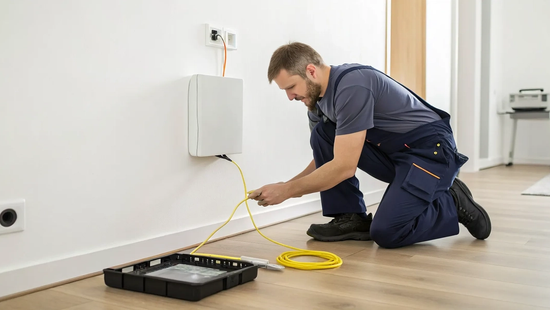
If you’re tired of buffering wheels and sluggish uploads, switching to fiber is a game-changer. This technology isn’t just a minor upgrade; it’s a whole new foundation for your digital life. But how does this futuristic connection actually get from our network into your living room? The magic happens on installation day. Understanding the fiber optic installation process helps you appreciate the precision and care that goes into creating a flawless connection. We’ll break down each step our technicians take, from carefully running the delicate glass lines to your home to optimizing your Wi-Fi for wall-to-wall coverage and incredible speed.
Key Takeaways
- Fiber is a superior technology: Unlike cable or DSL, fiber uses light to transmit data through glass strands, giving you faster, symmetrical speeds and a more reliable connection that isn't prone to weather-related slowdowns.
- Prepare your home for a smooth installation: Plan for a two to four hour appointment by clearing a central spot for your new router and marking any underground utility or sprinkler lines. Communicating with your technician ensures the best setup for your home.
- Trust the pros, then secure your network: A professional installation is essential for handling delicate fiber cables and ensuring optimal signal strength. Once your service is active, run a speed test and immediately change your Wi-Fi name and password to keep your connection secure.
What is Fiber Optic Internet?
Let's start with a simple question. What if your internet connection could send data at the speed of light? That’s the basic idea behind fiber optic internet. Instead of relying on old-school copper wires that transmit electrical signals (like cable or DSL internet), fiber uses incredibly thin strands of glass to send information as pulses of light. Think of it as the difference between sending a message by horse and carriage versus sending it with a laser beam. It sounds like something from the future, but this technology is here and ready to transform how you connect.
This isn't just a small step up; it's a giant leap forward. Because it uses light, fiber internet is significantly faster and more reliable. It delivers a stronger, more consistent signal over long distances, which means you get the speed you pay for, without the frustrating slowdowns you might be used to with older connections. For anyone who works from home, streams movies in 4K, or has a house full of connected devices, this difference is a game-changer. Novos Fiber's services are built on this powerful technology, bringing that next-level speed and reliability right to your door. It’s the modern infrastructure our digital lives demand, ensuring everything from video calls to online gaming is smooth and buffer-free.
How Fiber Works: Sending Data at the Speed of Light
The magic of fiber optics lies in how it moves data. Traditional internet sends electrical signals down a copper wire, but fiber optic internet sends information using pulses of light through thin glass strands. These strands, or optical fibers, are each about the thickness of a human hair. Bundled together, they form a fiber optic cable. When you click a link or start a stream, your data is converted into light pulses that travel through these glass strands at nearly the speed of light. This method is incredibly efficient, allowing for massive amounts of data to be sent and received almost instantly.
What Makes Fiber Different from Cable and DSL?
The biggest difference is the material. Fiber uses light to send data through glass, while cable and DSL use electricity through copper wires. This fundamental difference leads to huge advantages for fiber. Since light travels faster and loses less signal strength over distance, fiber offers much higher speeds, especially for uploads. You get symmetrical speeds, meaning your upload and download speeds are equally fast.
Fiber is also more durable. Unlike copper cables, fiber optic lines are not significantly affected by weather conditions like rain or extreme temperatures, ensuring a more consistent and reliable connection year-round. They are also immune to the kind of electrical interference that can disrupt a cable or DSL signal, giving you a cleaner, more stable connection. It's why we believe so strongly in building a true fiber network for our communities.
How to Prepare for Your Fiber Installation
Getting ready for your new fiber internet is exciting, and a little preparation can make installation day a breeze. Once you’ve confirmed that Novos Fiber is available in your area and scheduled your appointment, you’re just a few steps away from a super-fast connection. Taking a few minutes to get your home ready ensures our technicians can get you set up efficiently, so you can start streaming, gaming, and working without a hitch.
What to Do Before Your Technician Arrives
Before our technician knocks on your door, take a quick walk around your property. It’s helpful to know where your main utility lines, like water and gas, enter your home. If you have an underground sprinkler system or an invisible dog fence, mark their locations with small flags or spray paint. This simple step helps our team avoid any important lines when they run the fiber cable to your house. Also, think about where you’d like your new router to go. A central location is usually best, so try to clear a path and some space in that area for the equipment.
Chatting with Your Installation Team
Don’t be shy about talking with your technician. Our local team is here to find the best setup for your specific needs. Feel free to ask questions and point out any important spots, like a home office that needs a rock-solid connection or a smart TV in the basement. Open communication helps us understand your priorities and ensures we place the equipment in the optimal location for whole-home coverage. We’re your partners in getting you the best possible internet experience, and it all starts with a good conversation about how you use your internet.
Your Installation Day Checklist
On the day of your appointment, you can expect a straightforward process. Your technician will work with you to find the perfect spot for the indoor fiber terminal and your new Wi-Fi router. Once everything is in place, they will test the signal strength throughout your home to make sure you have a strong connection everywhere. Before they leave, you’ll get to connect a device to your new network and test it out yourself. This is your chance to make sure everything works as expected. If you have any questions after we leave, our support team is always here to help.
The Fiber Installation Process, Step-by-Step
Getting fiber internet installed is more straightforward than you might think. The whole process breaks down into four main steps, from bringing the connection to your street to getting your Wi-Fi running. Here’s a look at what you can expect on installation day.
Step 1: The Outdoor Prep Work
Long before our technician arrives, our team is busy with the outdoor prep work. This involves laying the main fiber lines in your neighborhood. We handle all the necessary permits to work in public utility easements, which are small portions of property designated for utilities. This groundwork ensures the main network is ready when it’s time for your home installation. You likely won’t notice this part happening, but it’s the crucial first step to bringing you blazing-fast service.
Step 2: Bringing the Fiber Line to Your Door
On your appointment day, the technician will run a dedicated fiber line from the main network connection on the street to your home. They are trained to do this with minimal disruption, often using an existing entry point for other utilities. If a new one is needed, they’ll drill a small, discreet hole and seal it properly to protect it from the elements. Our goal is to be respectful of your property while establishing a solid, reliable connection for your new internet service.
Step 3: Setting Up Your Indoor Gear
Once the fiber line is inside, it’s time to set up your equipment. The technician will install a small box called an Optical Network Terminal (ONT) to convert the fiber’s light signals. Then, they’ll connect our powerful Novos Fiber gateway, which is a combination modem and router. This device is what creates your home’s Wi-Fi network. We’ll work with you to place the gateway in a central location to ensure you get the best possible coverage throughout your home.
Step 4: Final Connection and Speed Test
The final step is to make sure everything works perfectly. The technician will activate your service and run a speed test to confirm you’re getting the speeds you signed up for. They’ll help you connect your first device to the new Wi-Fi and show you how to find your network name and password. We don’t consider the job done until you have a strong, stable signal. If you ever have questions later, our support team is always here to help.
How Long Does a Fiber Installation Take?
You've signed up for blazing-fast fiber internet, and now you're just waiting for installation day. It's natural to wonder how much time you'll need to set aside. While every home is a little different, we can give you a solid idea of what to expect. Most installations are pretty straightforward and wrap up within a few hours. The key is being prepared for the technician's visit so everything can go as smoothly as possible. Our team at Novos Fiber is focused on getting you connected quickly and correctly, so you can start enjoying your new high-speed service. Let's walk through the typical timeline and a few things that could add a little extra time to your appointment.
A Typical Installation Timeline
Plan on your fiber installation taking about two to four hours from start to finish. When our technician arrives, they’ll first chat with you to find the best spot for the new equipment inside your home. This is a great time to ask any questions you might have. Once you’ve agreed on a location, they’ll get to work. It's a good idea to block off a morning or afternoon and be available during the appointment, as your input is super helpful. A smooth installation process ensures your connection is strong and reliable from day one.
What Might Make Your Installation Take Longer?
Sometimes, an installation can hit a snag that extends the appointment beyond the usual four-hour window. This isn't common, but it's good to know what might cause a delay. For example, if the underground conduit leading to your home is blocked, the technician will need extra time to clear it. Other common issues include complex routing paths or the need to carefully handle the delicate glass cables to prevent damage. Our technicians are experts at handling these situations, but they can add time to the job. That’s why having a trained professional from a trusted local provider like Novos Fiber is so important for a smooth setup.
Why a Professional Installation Matters
You might be a seasoned DIY pro, but when it comes to fiber optic internet, a professional installation is the best way to guarantee you get the incredible speed and reliability you signed up for. Fiber technology is powerful but also incredibly precise. Unlike setting up a traditional cable modem, which is often plug-and-play, fiber installation involves handling delicate glass strands and specialized equipment to create a flawless connection from our network directly to your home.
Our local technicians are experts in this process. They ensure every step, from running the line to your house to configuring your indoor equipment, is done correctly. This professional touch prevents common issues that can slow down your service and sets you up for the best possible internet experience from day one. Think of it as the foundation for a faster, more reliable digital life.
Preventing Signal Loss and Damaged Cables
Fiber optic cables are the superhighways for your data, but they are surprisingly delicate. These cables contain thin strands of glass that can be easily damaged if bent too sharply, crushed, or cut. Even a tiny, invisible break can cause significant signal loss, leading to slower speeds and an unreliable connection. Common problems during installation often involve issues like improper cable splicing or tiny misalignments between connectors. Our professional installers are trained to handle these fragile lines with care, avoiding the pitfalls that can compromise your internet performance. They know the exact specifications for routing and connecting cables to ensure a strong, stable signal reaches your home.
The Right Tools for a Flawless Connection
Getting a perfect fiber connection requires more than just a drill and some wall clips. Professional technicians arrive with a toolkit full of specialized equipment designed for working with fiber optics. This includes precision cleavers for making clean cuts on glass fibers, fusion splicers to seamlessly join cables, and optical power meters to test the signal strength at every connection point. Using the right tools is critical for avoiding installation headaches and getting the job done right the first time. When our team handles your setup, you can be confident that every connection is clean, secure, and optimized for maximum performance, giving you a truly flawless connection.
Getting Your Network Set Up for Top Speed
The ultimate goal of a fiber installation is to get a pure, powerful light signal from our network to your router with minimal loss. This loss of optical power, known as attenuation, can happen for several reasons, from microscopic dust on a connector to a tiny gap between two joined fibers. Our technicians are experts at minimizing these common fiber optics problems. They meticulously clean every connection point and use testing equipment to verify that the signal is strong and clear. This attention to detail ensures your network is perfectly calibrated to deliver the top speeds your Novos Fiber plan promises.
You're Connected! Now What?
The installation is complete, and your home is officially wired for fiber internet. Congratulations! The hard part is over. Before you dive into a 4K movie marathon, there are a few quick things to do to make sure your new network is secure, stable, and delivering the performance you expect. We’ll walk through confirming your speed, connecting your devices, and securing your Wi-Fi. Taking a few minutes for these final touches ensures you get the most out of your new high-speed fiber internet from day one.
First Things First: Run a Speed Test
Before your installation technician leaves, they’ll run a speed test to confirm your connection is hitting the numbers you signed up for. This is the perfect time to watch and ask questions. Seeing those lightning-fast speeds in real-time is not only satisfying, but it’s also your quality check. If the results aren’t what you expected, the technician can investigate and resolve any issues on the spot. This final check ensures everything is working perfectly, so you can start using your internet with total confidence.
Get Your Devices Online and Lock Down Your Wi-Fi
With your speeds confirmed, it’s time to connect your devices. While the technician is still there, try connecting your phone, laptop, and a smart TV to the new Wi-Fi network. This helps verify the password is correct and the signal is strong. Once you’re set, a great next step is to personalize your network. We recommend changing the default Wi-Fi name (SSID) and password to something unique and easy for you to remember but hard for others to guess. This simple action is one of the most effective ways to keep your home network secure.
What to Do if You Need Support
Your new fiber connection should be smooth sailing, but we know questions can pop up as you get settled. Whether you’re connecting a tricky smart home device or just have a question about your service, we’re here to help. As a local provider, we pride ourselves on being accessible and responsive. You don’t have to go through a maze of automated menus to talk to a real person. If you ever need assistance, our dedicated support team is ready to make sure your internet experience is flawless.
Related Articles
Frequently Asked Questions
What's the difference between the two boxes you install? You'll see our technician set up two key pieces of gear: the Optical Network Terminal (ONT) and the gateway (your router). Think of the ONT as a translator. Its job is to convert the light signals from the fiber optic cable into an internet signal your devices can understand. The gateway then takes that signal and creates the powerful Wi-Fi network that covers your home.
Will the installation process damage my yard or home? Our technicians are trained to be as respectful of your property as possible. The process involves running a thin fiber line from the street to your house, which is often buried in a very narrow trench. If we need to drill a hole to bring the line inside, it's very small and is professionally sealed to protect against weather and pests. We work with you to find the least disruptive path for the cable.
Why are equal upload and download speeds such a big deal? Most internet connections give you fast download speeds but very slow upload speeds. Fiber offers symmetrical speeds, meaning your upload speed is just as fast as your download. This is a huge advantage for anyone who works from home, takes video calls, saves files to the cloud, or live streams. It means sending information is just as quick and seamless as receiving it, which eliminates lag and buffering on your end.
Do I need to be home for the entire installation appointment? Yes, we do require an adult to be present for the whole installation, which typically takes two to four hours. Your input is really important when the technician is deciding where to bring the fiber line into your home and where to place the indoor equipment for the best Wi-Fi coverage. Being there ensures the final setup is perfectly tailored to your needs.
What should I do about my old internet service? Once your new Novos Fiber internet is installed and running, you will need to contact your previous provider to cancel that service. We recommend waiting until our technician has confirmed your new connection is working perfectly before you make that call. This ensures you won't have any gap in internet access as you make the switch.


